Native OTel (CrewAI Enterprise)
CrewAI Enterprise ships an OpenTelemetry exporter built into the platform. Point it at our endpoint, set two env vars, and every crew run lands in ANTS Platform with zero code changes.
Prerequisites
- A CrewAI Enterprise account with permission to edit Settings → Organization and Environment Variables.
- ANTS Platform API keys. Generate them under Project Settings → API Keys in the ANTS Platform dashboard. You need both the
public_key(pk-ap-…) andsecret_key(sk-ap-…).
Setup
Generate the Authorization header
CrewAI's OTel collector authenticates with a single header. The value is
HTTP Basic auth: base64 of <public_key>:<secret_key>.
Copy the full output (including the Basic prefix). Treat it as a secret.
Add the OTel collector in CrewAI
In CrewAI Enterprise, go to Settings → Organization → OpenTelemetry Collectors → Add Collector. Fill in:
| Field | Value |
|---|---|
| Type | Traces |
| Endpoint | https://api.agenticants.ai/api/public/otel/v1/traces |
| Service Name | crewai (or any identifier; we use it for diagnostics only) |
| Custom Headers → Key | Authorization |
| Custom Headers → Value | The Basic … value you generated above |
| Certificate | Leave blank |
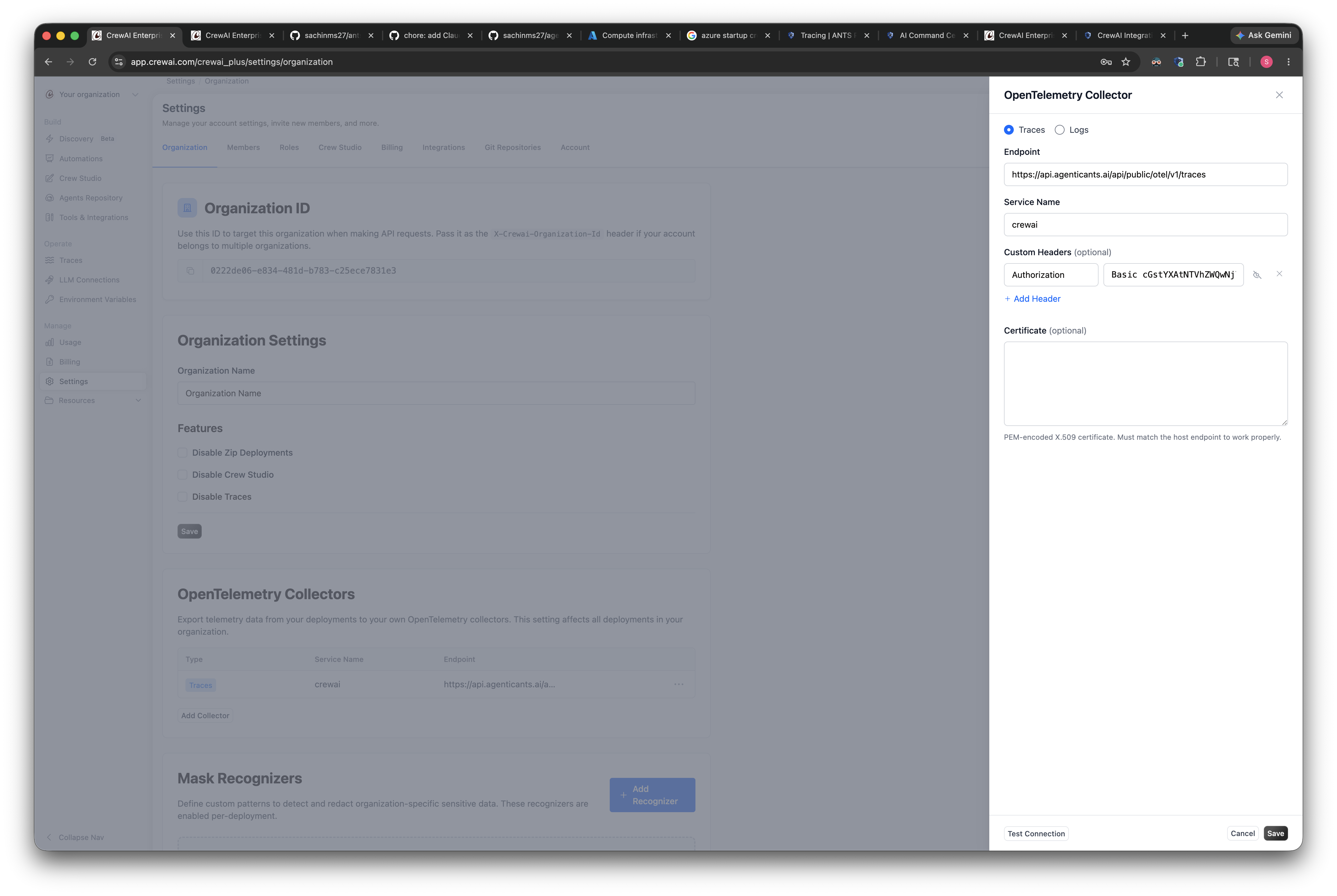
Hit Test Connection to confirm the endpoint accepts the credentials, then Save.
Set the GenAI semconv env vars
By default, CrewAI's exporter emits span structure but no message content or canonical token attributes. Two env vars unlock both. Go to Environment Variables in CrewAI Enterprise and add:
| Key | Value |
|---|---|
OTEL_INSTRUMENTATION_GENAI_CAPTURE_MESSAGE_CONTENT | span_and_event |
OTEL_SEMCONV_STABILITY_OPT_IN | gen_ai_latest_experimental |
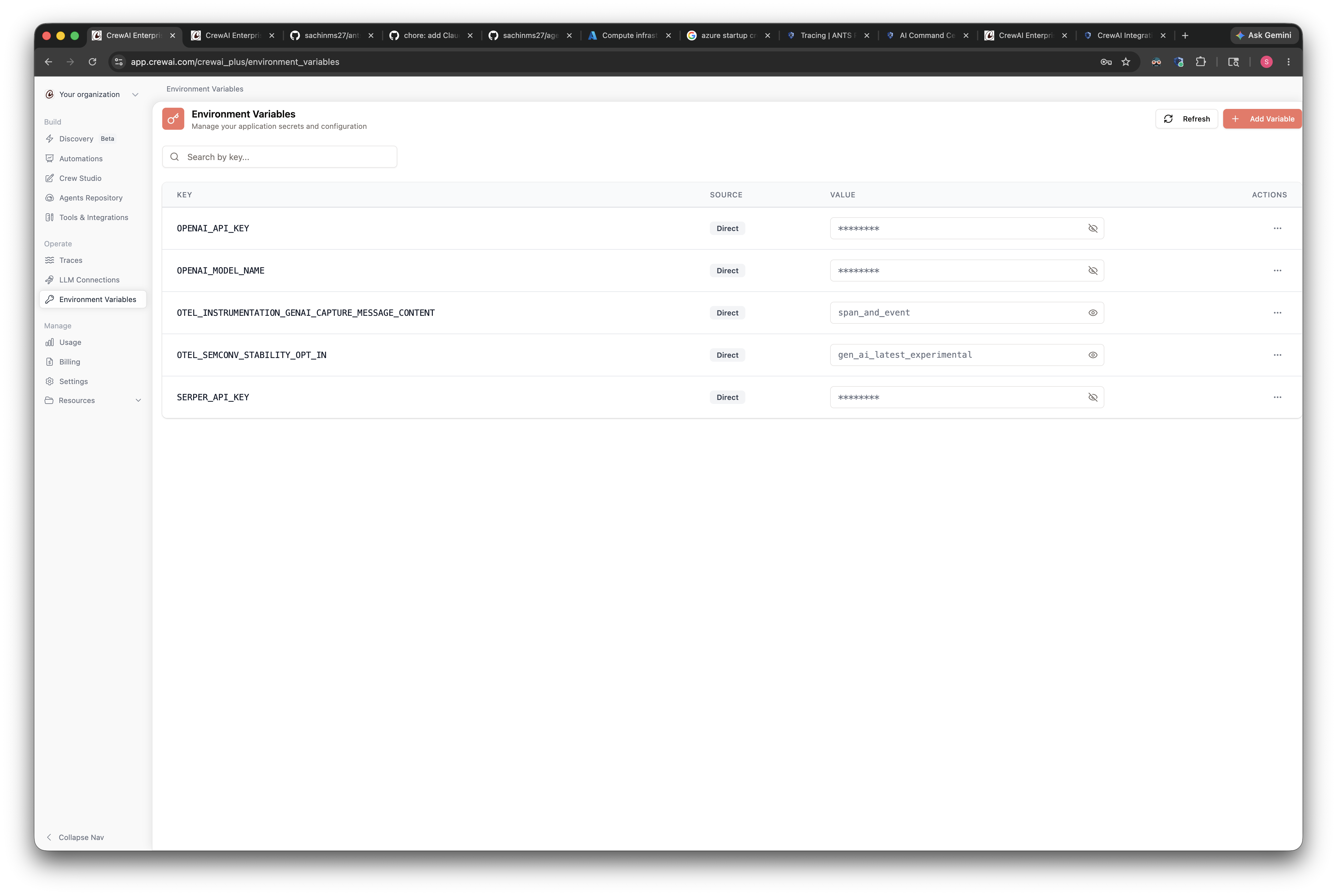
Without these two env vars you'll see spans in ANTS Platform with empty input/output panels and missing per-call token usage. They're cheap to set and required for full fidelity.
Run a crew
Trigger any crew from CrewAI Studio or via your usual deployment. Within a
few seconds, the trace appears under Tracing → Traces in ANTS Platform
named after crewai.crew.name (e.g. MarketIntelligenceContentPipelineCrew).
What's automatic
You don't have to configure any of these — they happen on every trace:
- Trace name = the crew name from
crewai.crew.name. - Tags =
framework:crewaipluscrew:<crew name>. - Session ID =
crewai.crew.id(groups runs of the same crew). Override withgen_ai.conversation.idif you have a user-defined session. - Per-agent rollup = every LLM and tool span is tagged with a stable, deterministic agent ID derived from the agent's role. The AI Command Center groups cost / latency / requests by this ID automatically.
- Cost = computed on our side. We map
gen_ai.request.modelagainst our pricing table and multiply bygen_ai.usage.*. If a model is missing, file a ticket. - Tool labels = humanised from
gen_ai.tool.name(e.g.search_the_internet_with_serper→Search the internet with serper).
End-user identity (optional but recommended)
CrewAI's OTel exporter doesn't emit user identity. To attribute traces to
the human who invoked the crew, attach user.id from the app that calls
crew.kickoff(). Three patterns, pick whichever fits your stack — none
need a new pip install since CrewAI already ships opentelemetry-api.
Option 1: W3C baggage (recommended)
Baggage rides on every child span automatically. One call attaches identity to the crew, every task, every agent, every LLM call.
We read baggage.user.id (and baggage.langfuse.user.id) into the
trace's userId field.
Option 2: Wrap kickoff in a parent OTel span
If you already wrap each automation run in a span for your own APM:
The parent span becomes the trace root and the crew is nested under it. Slightly noisier hierarchy in the UI — pick Option 1 if you don't already have your own span.
Option 3: Kickoff inputs (zero OTel)
The identifier shows up in the trace's Input panel under crewai.crew.inputs
but does not populate the per-user metrics — use only as a stopgap.
Recognised attribute keys
We read user identity from any of these on any span in the trace (we walk up to the root):
| Key | Notes |
|---|---|
user.id | OpenTelemetry standard. Default choice. |
baggage.user.id | Option 1 (baggage). |
langfuse.user.id | Legacy alias — still supported. |
enduser.id | Deprecated OTel cross-cutting key. Fallback only. |
Next
- Stuck on missing input / cost / user attribution? See Troubleshooting.
- Self-hosted CrewAI or want full Python-SDK control? Use the SDK approach instead.